Başlarken
Riverpod'u çevrimiçi deneyin
Riverpod'u tanımak için Dartpad üzerinde çevrimiçi deneyebilirsiniz:
Paketi kurmak
Riverpod, kendi başına yeterli olan bir ana "riverpod" paketi olarak gelir; buna kod üretimi (Kod üretimi hakkında) ve hook'lar (Hook'lar hakkında) için isteğe bağlı paketler eşlik eder.
Hangi paket(ler)i kurmak istediğinizi belirledikten sonra, bağımlılığı uygulamanıza tek satırda şu şekilde ekleyin:
- Flutter
- Yalnızca Dart
- riverpod
- riverpod + flutter_hooks
- riverpod_generator
- riverpod_generator + flutter_hooks
flutter pub add material_ui
flutter pub add flutter_riverpod
flutter pub add material_ui
flutter pub add hooks_riverpod
flutter pub add flutter_hooks
flutter pub add material_ui
flutter pub add flutter_riverpod
flutter pub add riverpod_annotation
flutter pub add dev:riverpod_generator
flutter pub add dev:build_runner
flutter pub add material_ui
flutter pub add hooks_riverpod
flutter pub add flutter_hooks
flutter pub add riverpod_annotation
flutter pub add dev:riverpod_generator
flutter pub add dev:build_runner
- riverpod
- riverpod_generator
dart pub add riverpod
dart pub add riverpod
dart pub add riverpod_annotation
dart pub add dev:riverpod_generator
dart pub add dev:build_runner
Alternatif olarak, bağımlılığı pubspec.yaml dosyanızdan elle de ekleyebilirsiniz:
- Flutter
- Yalnızca Dart
- riverpod
- riverpod + flutter_hooks
- riverpod_generator
- riverpod_generator + flutter_hooks
name: my_app_name
environment:
  sdk: ^3.12.0
  flutter: ">=3.44.0"

dependencies:
  flutter:
    sdk: flutter
  material_ui: ^1.0.0
  flutter_riverpod: ^3.4.3
name: my_app_name
environment:
  sdk: ^3.12.0
  flutter: ">=3.44.0"

dependencies:
  flutter:
    sdk: flutter
  material_ui: ^1.0.0
  hooks_riverpod: ^3.4.3
  flutter_hooks:
name: my_app_name
environment:
  sdk: ^3.12.0
  flutter: ">=3.44.0"

dependencies:
  flutter:
    sdk: flutter
  material_ui: ^1.0.0
  flutter_riverpod: ^3.4.3
  riverpod_annotation: ^4.0.7

dev_dependencies:
  build_runner:
  riverpod_generator: ^4.0.9
name: my_app_name
environment:
  sdk: ^3.12.0
  flutter: ">=3.44.0"

dependencies:
  flutter:
    sdk: flutter
  material_ui: ^1.0.0
  hooks_riverpod: ^3.4.3
  flutter_hooks:
  riverpod_annotation: ^4.0.7

dev_dependencies:
  build_runner:
  riverpod_generator: ^4.0.9
Ardından paketleri flutter pub get ile kurun.
- riverpod
- riverpod_generator
name: my_app_name
environment:
  sdk: ^3.7.0

dependencies:
  riverpod: ^3.4.3
name: my_app_name
environment:
  sdk: ^3.7.0

dependencies:
  riverpod: ^3.4.3
  riverpod_annotation: ^4.0.7

dev_dependencies:
  build_runner:
  riverpod_generator: ^4.0.9
Ardından paketleri dart pub get ile kurun.
Kod üretimi kullanıyorsanız, kod üreticisini şu komutla çalıştırabilirsiniz:
dart run build_runner watch -d
Hepsi bu kadar. Riverpod'u uygulamanıza eklediniz!
riverpod_lint'i etkinleştirmek
Riverpod, daha iyi kod yazmanıza yardımcı olacak lint kuralları ve özel yeniden düzenleme (refactoring) seçenekleri sunan, isteğe bağlı bir riverpod_lint paketiyle birlikte gelir.
Riverpod_lint, analysis_server_plugin kullanılarak geliştirilmiştir. Bu nedenle analysis_options.yaml üzerinden kurulur.
Kısacası, pubspec.yaml dosyanızın yanına bir analysis_options.yaml oluşturun ve şunu ekleyin:
plugins:
  riverpod_lint: <https://pub.dev/packages/riverpod_lint adresindeki en son sürüm>
Artık Riverpod'u kullanırken hata yaptığınızda IDE'nizde uyarılar görmelisiniz.
Uyarıların ve yeniden düzenleme seçeneklerinin tam listesi için riverpod_lint sayfasına göz atın.
Kullanım örneği: Merhaba dünya
Riverpod'u kurduğumuza göre artık kullanmaya başlayabiliriz.
Aşağıdaki kod parçaları, yeni bağımlılığımızı kullanarak nasıl bir "Merhaba dünya" yazılacağını gösteriyor:
- Flutter
- Yalnızca Dart
- riverpod
- riverpod + flutter_hooks
- riverpod_generator
- riverpod_generator + flutter_hooks
import 'package:flutter_riverpod/flutter_riverpod.dart';
import 'package:material_ui/material_ui.dart';
// Bir değer saklayacak (burada "Hello world") bir "provider" oluşturuyoruz.
// Bir provider kullanmak, sunulan değeri sahteleyebilmemizi/geçersiz kılabilmemizi sağlar.
final helloWorldProvider = Provider((_) => 'Hello world');
void main() {
runApp(
// Widget'ların provider'ları okuyabilmesi için tüm uygulamayı bir
// "ProviderScope" widget'ı ile sarmalamamız gerekir.
// Provider'larımızın durumu burada saklanır.
ProviderScope(
child: MyApp(),
),
);
}
// Riverpod tarafından sunulan ConsumerWidget'tan türetin, StatelessWidget'tan değil
class MyApp extends ConsumerWidget {
Widget build(BuildContext context, WidgetRef ref) {
final String value = ref.watch(helloWorldProvider);
return MaterialApp(
home: Scaffold(
appBar: AppBar(title: const Text('Example')),
body: Center(
child: Text(value),
),
),
);
}
}
import 'package:flutter_hooks/flutter_hooks.dart';
import 'package:hooks_riverpod/hooks_riverpod.dart';
import 'package:material_ui/material_ui.dart';
// Bir değer saklayacak (burada "Hello world") bir "provider" oluşturuyoruz.
// Bir provider kullanmak, sunulan değeri sahteleyebilmemizi/geçersiz kılabilmemizi sağlar.
final helloWorldProvider = Provider((_) => 'Hello world');
void main() {
runApp(
// Widget'ların provider'ları okuyabilmesi için tüm uygulamayı bir
// "ProviderScope" widget'ı ile sarmalamamız gerekir.
// Provider'larımızın durumu burada saklanır.
ProviderScope(
child: MyApp(),
),
);
}
// Extend HookConsumerWidget instead of HookWidget, which is exposed by Riverpod
class MyApp extends HookConsumerWidget {
Widget build(BuildContext context, WidgetRef ref) {
// We can use hooks inside HookConsumerWidget
final counter = useState(0);
final String value = ref.watch(helloWorldProvider);
return MaterialApp(
home: Scaffold(
appBar: AppBar(title: const Text('Example')),
body: Center(
child: Text('$value ${counter.value}'),
),
),
);
}
}
import 'package:flutter_riverpod/flutter_riverpod.dart';
import 'package:material_ui/material_ui.dart';
import 'package:riverpod_annotation/riverpod_annotation.dart';
part 'main.g.dart';
// Bir değer saklayacak (burada "Hello world") bir "provider" oluşturuyoruz.
// Bir provider kullanmak, sunulan değeri sahteleyebilmemizi/geçersiz kılabilmemizi sağlar.
String helloWorld(Ref ref) {
return 'Hello world';
}
void main() {
runApp(
// Widget'ların provider'ları okuyabilmesi için tüm uygulamayı bir
// "ProviderScope" widget'ı ile sarmalamamız gerekir.
// Provider'larımızın durumu burada saklanır.
ProviderScope(
child: MyApp(),
),
);
}
// Riverpod tarafından sunulan ConsumerWidget'tan türetin, StatelessWidget'tan değil
class MyApp extends ConsumerWidget {
Widget build(BuildContext context, WidgetRef ref) {
final String value = ref.watch(helloWorldProvider);
return MaterialApp(
home: Scaffold(
appBar: AppBar(title: const Text('Example')),
body: Center(
child: Text(value),
),
),
);
}
}
import 'package:flutter_hooks/flutter_hooks.dart';
import 'package:hooks_riverpod/hooks_riverpod.dart';
import 'package:material_ui/material_ui.dart';
import 'package:riverpod_annotation/riverpod_annotation.dart';
part 'main.g.dart';
// Bir değer saklayacak (burada "Hello world") bir "provider" oluşturuyoruz.
// Bir provider kullanmak, sunulan değeri sahteleyebilmemizi/geçersiz kılabilmemizi sağlar.
String helloWorld(Ref ref) {
return 'Hello world';
}
void main() {
runApp(
// Widget'ların provider'ları okuyabilmesi için tüm uygulamayı bir
// "ProviderScope" widget'ı ile sarmalamamız gerekir.
// Provider'larımızın durumu burada saklanır.
ProviderScope(
child: MyApp(),
),
);
}
// Extend HookConsumerWidget instead of HookWidget, which is exposed by Riverpod
class MyApp extends HookConsumerWidget {
Widget build(BuildContext context, WidgetRef ref) {
// We can use hooks inside HookConsumerWidget
final counter = useState(0);
final String value = ref.watch(helloWorldProvider);
return MaterialApp(
home: Scaffold(
appBar: AppBar(title: const Text('Example')),
body: Center(
child: Text('$value ${counter.value}'),
),
),
);
}
}
Ardından uygulamayı flutter run ile başlatın.
Bu, cihazınızda "Hello world" yazısını gösterecektir.
- riverpod
- riverpod_generator
import 'package:riverpod/riverpod.dart';

// We create a "provider", which will store a value (here "Hello world").
// By using a provider, this allows us to mock/override the value exposed.
final helloWorldProvider = Provider((_) => 'Hello world');

void main() {
  // This object is where the state of our providers will be stored.
  final container = ProviderContainer();

  // Thanks to "container", we can read our provider.
  final value = container.read(helloWorldProvider);

  print(value); // Hello world
}
import 'package:riverpod_annotation/riverpod_annotation.dart';
part 'main.g.dart';
// We create a "provider", which will store a value (here "Hello world").
// By using a provider, this allows us to mock/override the value exposed.
String helloWorld(Ref ref) {
return 'Hello world';
}
void main() {
// This object is where the state of our providers will be stored.
final container = ProviderContainer();
// Thanks to "container", we can read our provider.
final value = container.read(helloWorldProvider);
print(value); // Hello world
}
Ardından uygulamayı dart lib/main.dart ile başlatın.
Bu, konsola "Hello world" yazdıracaktır.
Daha ileriye: kod parçacıklarını kurmak
Flutter ve VS Code kullanıyorsanız Flutter Riverpod Snippets eklentisini değerlendirin.
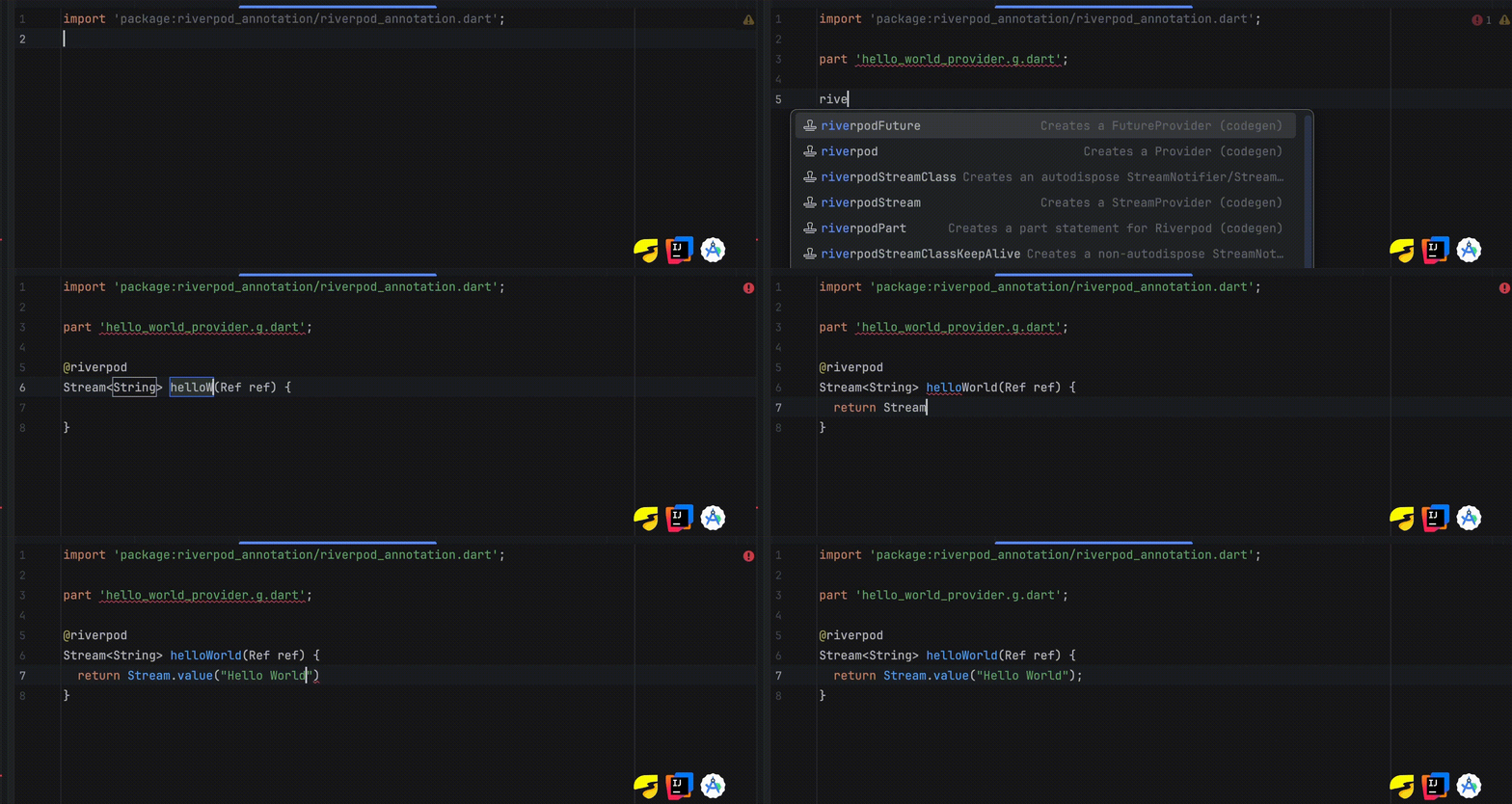
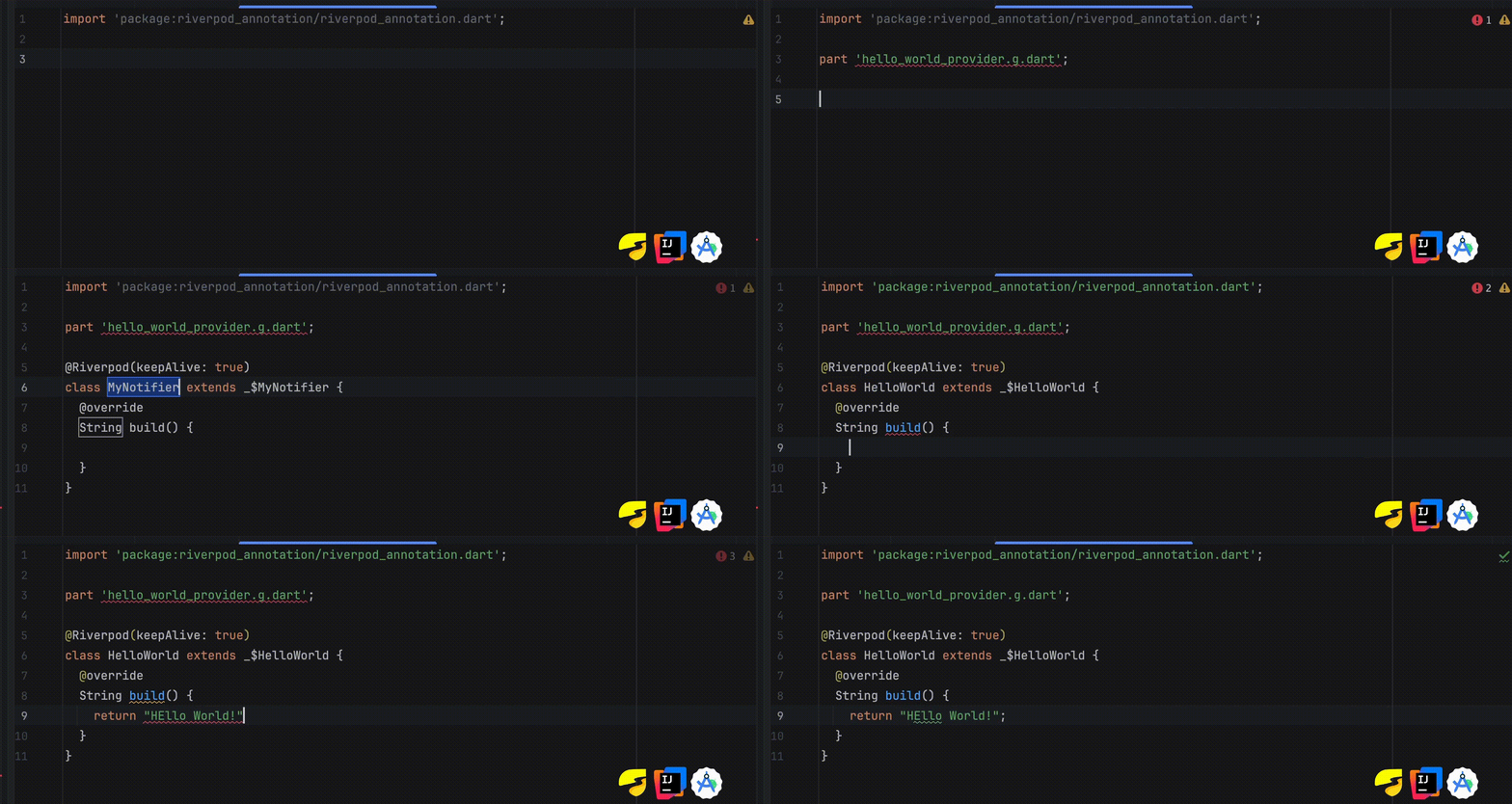
Flutter ve Android Studio veya IntelliJ kullanıyorsanız Riverpod Gen Shortcuts ya da Flutter Riverpod Snippets eklentisini değerlendirin.
Örnek: Üreticiyi kullanmak - Riverpod Stream (riverpodStream)
Örnek: Üreticiyi kullanmak - Riverpod Class (riverpodClassKeepAlive)
Flutter Riverpod Snippets
