당겨서 새로고침(pull-to-refresh) 구현하기
Riverpod은 선언적인 특성 덕분에 당겨서 새로고침을 기본적으로 지원합니다.
일반적으로 당겨서 새로고침은 해결해야 할 문제가 여러 가지라서 복잡해지기 쉽습니다.
- 페이지에 처음 들어왔을 때는 스피너를 보여 주고 싶습니다. 하지만 새로고침 중에는 스피너 대신 새로고침 인디케이터를 보여 주고 싶습니다. 새로고침 인디케이터와 스피너를 동시에 보여 주어서는 안 됩니다.
- 새로고침이 진행되는 동안에는 이전 데이터/오류를 보여 주고 싶습니다.
- 새로고침이 진행되는 동안에는 계속 새로고침 인디케이터를 보여 주어야 합니다.
Riverpod으로 이 문제를 어떻게 해결하는지 살펴보겠습니다.
이를 위해 사용자에게 무작위 활동을 추천하는 간단한 예제를 만듭니다.
당겨서 새로고침하면 새로운 추천을 받아 옵니다.
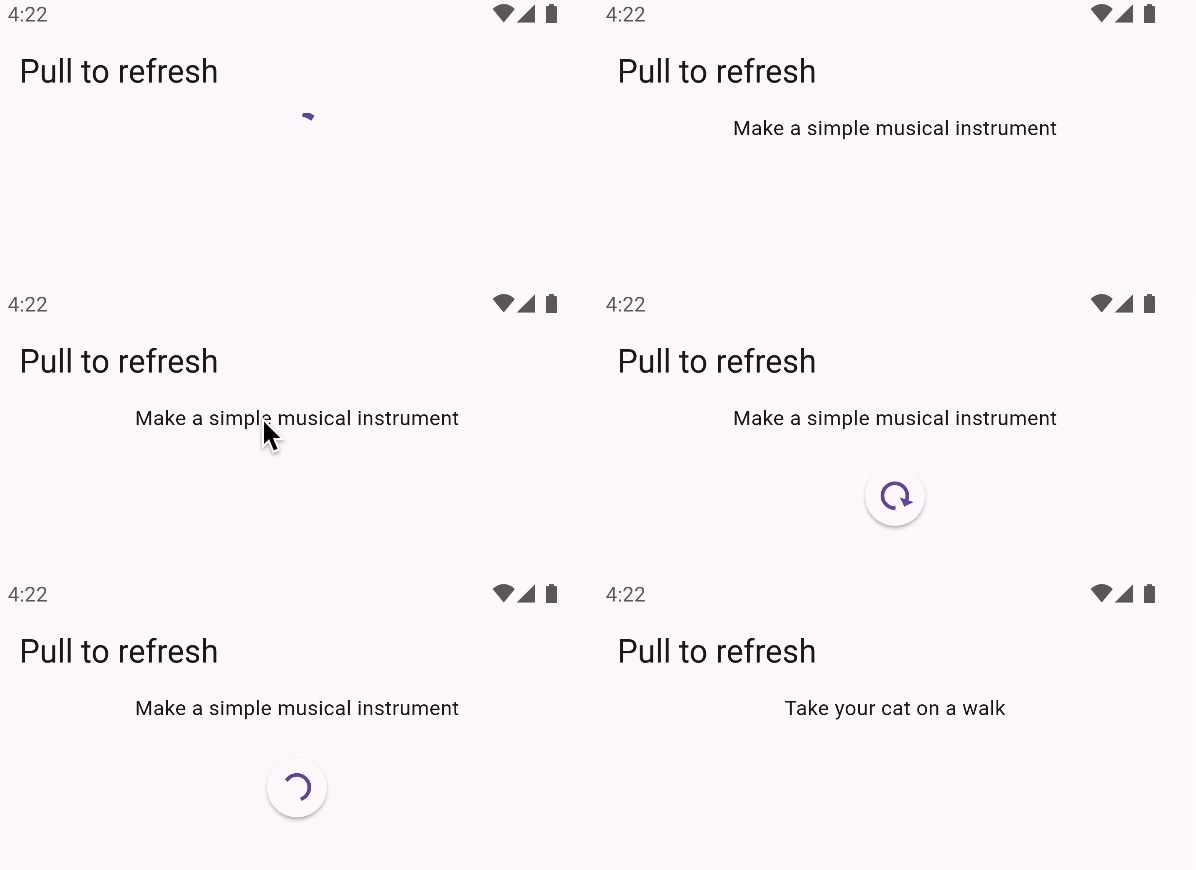
기본 애플리케이션 만들기
당겨서 새로고침을 구현하려면 먼저 새로고침할 대상이 있어야 합니다.
Bored API를 사용해 사용자에게 무작위 활동을
추천하는 간단한 애플리케이션을 만들어 보겠습니다.
먼저 Activity 클래스를 정의합니다.
- riverpod
- riverpod_generator
class Activity {
  Activity({
    required this.activity,
    required this.type,
    required this.participants,
    required this.price,
  });

  factory Activity.fromJson(Map<Object?, Object?> json) {
    return Activity(
      activity: json['activity']! as String,
      type: json['type']! as String,
      participants: json['participants']! as int,
      price: (json['price']! as num).toDouble(),
    );
  }

  final String activity;
  final String type;
  final int participants;
  final double price;
}
sealed class Activity with _$Activity {
factory Activity({
required String activity,
required String type,
required int participants,
required double price,
}) = _Activity;
factory Activity.fromJson(Map<String, dynamic> json) =>
_$ActivityFromJson(json);
}
이 클래스는 추천된 활동을 타입 안전하게 표현하고,
JSON 인코딩/디코딩을 처리합니다.
Freezed/json_serializable을 꼭 사용해야 하는 것은 아니지만, 권장합니다.
이제 HTTP GET 요청을 보내 활동 하나를 가져오는 provider를 정의합니다.
- riverpod
- riverpod_generator
final activityProvider = FutureProvider.autoDispose<Activity>((ref) async {
  final response = await http.get(
    Uri.https('www.boredapi.com', '/api/activity'),
  );

  final json = jsonDecode(response.body) as Map;
  return Activity.fromJson(json);
});
Future<Activity> activity(Ref ref) async {
final response = await http.get(
Uri.https('www.boredapi.com', '/api/activity'),
);
final json = jsonDecode(response.body) as Map;
return Activity.fromJson(Map.from(json));
}
이제 이 provider를 사용해 무작위 활동을 표시할 수 있습니다.
지금은 로딩/오류 상태를 처리하지 않고,
활동을 사용할 수 있을 때 표시하기만 합니다.
class ActivityView extends ConsumerWidget {
Widget build(BuildContext context, WidgetRef ref) {
final activity = ref.watch(activityProvider);
return Scaffold(
appBar: AppBar(title: const Text('Pull to refresh')),
body: Center(
// 활동이 있으면 표시하고, 없으면 기다립니다
child: Text(activity.value?.activity ?? ''),
),
);
}
}
RefreshIndicator 추가하기
간단한 애플리케이션이 준비되었으니 RefreshIndicator를 추가할 수 있습니다.
이 위젯은 사용자가 화면을 아래로 당기면 새로고침 인디케이터를 표시하는
공식 Material 위젯입니다.
RefreshIndicator를 사용하려면 스크롤 가능한 영역이 필요합니다. 하지만 아직은
그런 영역이 없습니다. ListView/GridView/SingleChildScrollView 등을 사용해
해결할 수 있습니다.
class ActivityView extends ConsumerWidget {
Widget build(BuildContext context, WidgetRef ref) {
final activity = ref.watch(activityProvider);
return Scaffold(
appBar: AppBar(title: const Text('Pull to refresh')),
body: RefreshIndicator(
onRefresh: () async => print('refresh'),
child: ListView(
children: [
Text(activity.value?.activity ?? ''),
],
),
),
);
}
}
이제 사용자가 화면을 아래로 당길 수 있습니다. 하지만 아직 데이터는 새로고침되지 않습니다.
새로고침 로직 추가하기
사용자가 화면을 아래로 당기면 RefreshIndicator가 onRefresh 콜백을
호출합니다. 이 콜백에서 데이터를 새로고침할 수 있습니다.
콜백 안에서 ref.refresh를 사용해 원하는 provider를 새로고침하면 됩니다.
참고: onRefresh는 Future를 반환해야 합니다.
그리고 이 future는 새로고침이 끝났을 때 완료되어야 합니다.
이런 future를 얻으려면 provider의 .future 프로퍼티를 읽으면 됩니다.
이 프로퍼티는 provider가 결과를 내놓았을 때 완료되는 future를 반환합니다.
따라서 RefreshIndicator를 다음과 같이 수정할 수 있습니다.
class ActivityView extends ConsumerWidget {
Widget build(BuildContext context, WidgetRef ref) {
final activity = ref.watch(activityProvider);
return Scaffold(
appBar: AppBar(title: const Text('Pull to refresh')),
body: RefreshIndicator(
// "activityProvider.future"를 새로고침하고 그 결과를 반환하면,
// 새 활동을 가져올 때까지 새로고침 인디케이터가 계속
// 표시됩니다.
onRefresh: () => ref.refresh(activityProvider.future),
child: ListView(
children: [
Text(activity.value?.activity ?? ''),
],
),
),
);
}
}
첫 로딩 때만 스피너를 보여 주고 오류 처리하기
지금은 UI가 오류/로딩 상태를 처리하지 않습니다.
대신 로딩/새로고침이 끝나면 데이터가 갑자기 나타납니다.
이 상태들을 제대로 처리하도록 바꿔 보겠습니다. 경우는 두 가지입니다.
- 첫 로딩 중에는 전체 화면 스피너를 보여 주고 싶습니다.
- 새로고침 중에는 새로고침 인디케이터와 함께 이전 데이터/오류를 보여 주고 싶습니다.
다행히 Riverpod에서 비동기 provider를 구독하면
필요한 모든 것을 제공하는 AsyncValue를 얻을 수 있습니다.
이 AsyncValue는 Dart 3.0의 패턴 매칭과 다음과 같이
조합할 수 있습니다.
class ActivityView extends ConsumerWidget {
Widget build(BuildContext context, WidgetRef ref) {
final activity = ref.watch(activityProvider);
return Scaffold(
appBar: AppBar(title: const Text('Pull to refresh')),
body: RefreshIndicator(
onRefresh: () => ref.refresh(activityProvider.future),
child: ListView(
children: [
switch (activity) {
// 데이터가 있으면 표시합니다.
// 새로고침 중에도 데이터는 계속 사용할 수 있다는 점에 유의하세요.
AsyncValue<Activity>(:final value?) => Text(value.activity),
// 오류가 있으므로 오류를 표시합니다.
AsyncValue(:final error?) => Text('Error: $error'),
// 데이터/오류가 없으므로 로딩 상태입니다.
_ => const CircularProgressIndicator(),
},
],
),
),
);
}
}
여기서는 valueOrNull을 사용합니다. 현재는 오류/로딩 상태에서
value를 사용하면 예외가 발생하기 때문입니다.
Riverpod 3.0에서는 value가 valueOrNull처럼 동작하도록 바뀔 예정입니다.
하지만 지금은 valueOrNull을 사용하겠습니다.
패턴 매칭에서 :final valueOrNull? 문법을 사용한 점에 주목하세요.
이 문법은 activityProvider가 null이 될 수 없는 Activity를
반환하기 때문에 사용할 수 있습니다.
데이터가 null일 수 있다면 대신 AsyncValue(hasData: true, :final valueOrNull)을 사용하면 됩니다.
글자 수가 조금 늘어나는 대신, 데이터가 null인 경우도
올바르게 처리할 수 있습니다.
마무리: 전체 애플리케이션
지금까지 다룬 내용을 모두 합친 전체 소스 코드입니다.
- riverpod
- riverpod_generator
import 'dart:convert';
import 'package:flutter_riverpod/flutter_riverpod.dart';
import 'package:http/http.dart' as http;
import 'package:material_ui/material_ui.dart';
void main() => runApp(ProviderScope(child: MyApp()));
class MyApp extends StatelessWidget {
Widget build(BuildContext context) {
return MaterialApp(home: ActivityView());
}
}
class ActivityView extends ConsumerWidget {
Widget build(BuildContext context, WidgetRef ref) {
final activity = ref.watch(activityProvider);
return Scaffold(
appBar: AppBar(title: const Text('Pull to refresh')),
body: RefreshIndicator(
onRefresh: () => ref.refresh(activityProvider.future),
child: ListView(
children: [
switch (activity) {
AsyncValue<Activity>(:final value?) => Text(value.activity),
AsyncValue(:final error?) => Text('Error: $error'),
_ => const CircularProgressIndicator(),
},
],
),
),
);
}
}
final activityProvider = FutureProvider.autoDispose<Activity>((ref) async {
final response = await http.get(
Uri.https('www.boredapi.com', '/api/activity'),
);
final json = jsonDecode(response.body) as Map;
return Activity.fromJson(json);
});
class Activity {
Activity({
required this.activity,
required this.type,
required this.participants,
required this.price,
});
factory Activity.fromJson(Map<Object?, Object?> json) {
return Activity(
activity: json['activity']! as String,
type: json['type']! as String,
participants: json['participants']! as int,
price: (json['price']! as num).toDouble(),
);
}
final String activity;
final String type;
final int participants;
final double price;
}
import 'dart:convert';
import 'package:flutter_riverpod/flutter_riverpod.dart';
import 'package:freezed_annotation/freezed_annotation.dart';
import 'package:http/http.dart' as http;
import 'package:material_ui/material_ui.dart';
import 'package:riverpod_annotation/riverpod_annotation.dart';
part 'codegen.freezed.dart';
part 'codegen.g.dart';
void main() => runApp(ProviderScope(child: MyApp()));
class MyApp extends StatelessWidget {
Widget build(BuildContext context) {
return MaterialApp(home: ActivityView());
}
}
class ActivityView extends ConsumerWidget {
Widget build(BuildContext context, WidgetRef ref) {
final activity = ref.watch(activityProvider);
return Scaffold(
appBar: AppBar(title: const Text('Pull to refresh')),
body: RefreshIndicator(
onRefresh: () => ref.refresh(activityProvider.future),
child: ListView(
children: [
switch (activity) {
AsyncValue<Activity>(:final value?) => Text(value.activity),
AsyncValue(:final error?) => Text('Error: $error'),
_ => const CircularProgressIndicator(),
},
],
),
),
);
}
}
Future<Activity> activity(Ref ref) async {
final response = await http.get(
Uri.https('www.boredapi.com', '/api/activity'),
);
final json = jsonDecode(response.body) as Map;
return Activity.fromJson(Map.from(json));
}
sealed class Activity with _$Activity {
factory Activity({
required String activity,
required String type,
required int participants,
required double price,
}) = _Activity;
factory Activity.fromJson(Map<String, dynamic> json) =>
_$ActivityFromJson(json);
}