Mutation (실험적)
mutation은 실험적 기능이며, 메이저 버전 업 없이도 API가 호환되지 않는 방식으로 바뀔 수 있습니다.
Riverpod에서 mutation은 UI가 상태 변경에 반응할 수 있게 해 주는 객체입니다. 대표적인 사용 사례는 폼을 제출하는 동안 로딩 인디케이터를 보여 주는 것입니다.
간단히 말해, mutation은 다음과 같은 효과를 구현하기 위한 것입니다.
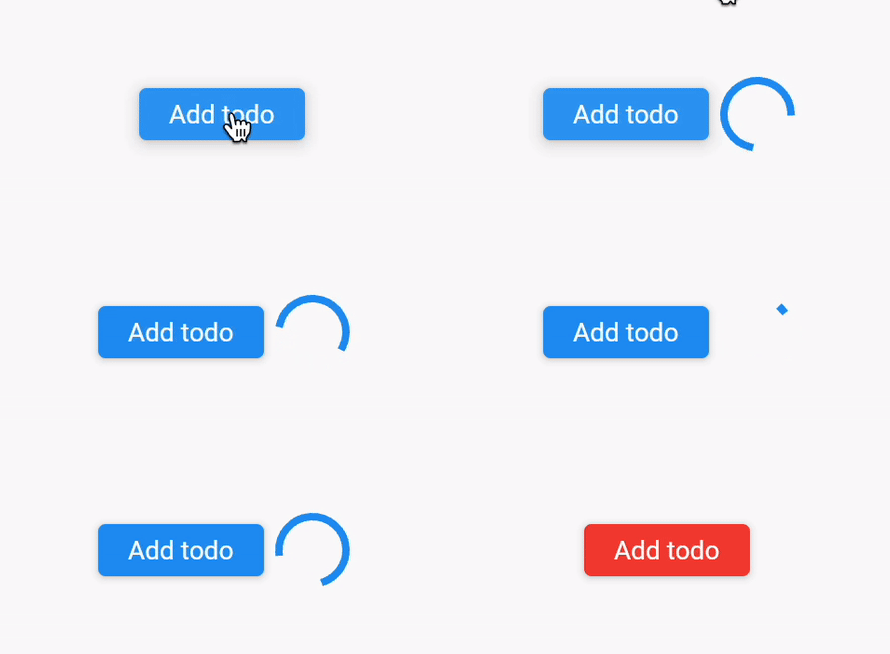
mutation이 없다면 폼 제출 진행 상황을 provider의 상태에 직접 저장해야 합니다. 이는 provider의 상태를 UI 관심사로 오염시키므로 바람직하지 않으며, 로딩·에러·성공 상태를 처리하기 위한 보일러플레이트 코드도 많이 필요합니다.
mutation은 이런 문제를 더 우아하게 처리하도록 설계되었습니다.
mutation 정의하기
mutation은 Mutation 객체의 인스턴스이며, 보통 어딘가의 final 변수에 저장합니다.
// "할 일 추가" 작업을 추적하는 mutation입니다.
// 제네릭 타입은 선택 사항이며, 지정하면 UI에서
// mutation의 결과를 활용할 수 있습니다.
final addTodo = Mutation<Todo>();
이 변수는 보통 전역 변수이거나 Notifier의
static final 변수로 선언합니다.
mutation 수신하기
mutation을 정의했다면 Consumer나 Provider 안에서 사용할 수 있습니다.
이를 위해서는 Ref가 필요하며, 원하는 수신 메서드를
선택합니다(보통 Ref.watch).
일반적인 예시는 다음과 같습니다.
class Example extends ConsumerWidget {
const Example({super.key});
Widget build(BuildContext context, WidgetRef ref) {
// We listen to the current state of the "addTodo" mutation.
// Listening to this will not perform any side effects by itself.
final addTodoState = ref.watch(addTodo);
return Row(
children: [
ElevatedButton(
style: ButtonStyle(
// If there is an error, we show the button in red
backgroundColor: switch (addTodoState) {
MutationError() => const WidgetStatePropertyAll(Colors.red),
_ => null,
},
),
onPressed: () {
addTodo.run(ref, (_) async {
// todo
});
},
child: const Text('Add todo'),
),
// The operation is pending, let's show a progress indicator
if (addTodoState is MutationPending) ...[
const SizedBox(width: 8),
const CircularProgressIndicator(),
],
],
);
}
}
mutation 스코핑하기
같은 mutation의 인스턴스가 여러 개 필요할 때가 있습니다.
id처럼 mutation을 고유하게 구분하는 매개변수가 여기에 해당합니다.
목록에서 특정 항목을 삭제하는 경우처럼, 같은 mutation의 인스턴스를 여러 개 두고 싶을 때 유용합니다.
고유한 키를 넘겨 mutation을 호출하기만 하면 됩니다.
final removeTodo = Mutation<void>();
final removeTodoWithId = removeTodo(todo.id);
때로는 mutation의 반환 타입이 제네릭인 경우도 있습니다. 예를 들어 역직렬화처럼 입력 매개변수에 따라 API 응답 타입이 달라질 수 있는 경우입니다.
final create = Mutation<ApiResponse>();
final createTodo = create<CreatedResponse<Todo>>('create_todo');

Future<void> executeCreateTodo(MutationTarget ref) async {
  await createTodo.run(ref, (tsx) async {
    final client = tsx.get(apiProvider);
    final response = client.post('/todos', data: {'title': 'Eat a cookie'});
    return CreatedResponse<Todo>.fromJson(response.data, Todo.fromJson);
  });
}
mutation 실행하기
지금까지는 mutation의 상태를 수신하기만 했을 뿐, 실제로 일어나는 일은 아직 없습니다.
mutation을 실행하려면 Mutation.run에 mutation을 넘기고, 원하는 상태를 업데이트하는 비동기 콜백을 제공합니다. 마지막으로 mutation의 제네릭 타입에 맞는 값을 반환해야 합니다.
return ElevatedButton(
  onPressed: () {
    // Trigger the mutation, and run the callback.
    // Reads inside the callback keep providers alive
    // for the duration of the mutation.
    addTodo.run(ref, (tsx) async {
      final todoNotifier = tsx.get(todoNotifierProvider.notifier);

      // We perform a request using a Notifier.
      final createdTodo = await todoNotifier.addTodo('Eat a cookie');

      // We return the created todo. This enables our UI to show information
      // about the created todo, such as its ID/creation date/etc.
      return createdTodo;
    });
  },
  child: const Text('Add todo'),
);
mutation의 상태와 그 의미
mutation은 다음 상태 중 하나를 가집니다.
- MutationPending: mutation이 시작되어 현재 로딩 중입니다.
- MutationError: mutation이 실패했으며, 에러를 확인할 수 있습니다.
- MutationSuccess: mutation이 성공했으며, 결과를 확인할 수 있습니다.
- MutationIdle: mutation이 아직 호출되지 않았거나 초기화되었습니다.
switch 문으로 각 상태를 분기할 수 있습니다.
switch (addTodoState) {
  case MutationIdle():
  // Show a button to add a todo
  case MutationPending():
  // Show a loading indicator
  case MutationError():
  // Show an error message
  case MutationSuccess():
  // Show the created todo
}
한 번 실행한 mutation을 idle 상태로 되돌리려면?
mutation은 다음 조건을 만족하면 자동으로 MutationIdle 상태로 돌아갑니다.
- 완료되었을 때(성공이든 에러든).
- 모든 리스너가 제거되었을 때(예: 스피너 위젯이 제거된 경우)
이는 자동 폐기의 동작 방식과 비슷하지만, mutation에 적용된다는 점이 다릅니다.
또는 Mutation.reset 메서드를 호출해 mutation을 직접 idle 상태로 초기화할 수도 있습니다.
return ElevatedButton(
  onPressed: () {
    // Reset the mutation to its idle state.
    addTodo.reset(ref);
  },
  child: const Text('Reset mutation'),
);